Simple Travel Tips for Japan
Really just don't be a jerk
Published: March 23, 2025
Updated: April 6, 2026

There are lots of videos and blogs out there about traveling to Japan. After a few experiences, this is, in my opinion, all you really need to know.
Don't be a Jerk
The #1 thing is to just not be a jerk. There is so much out there about being quiet, don't talk to your phone, bow, etc. This really comes down to not being a jerk.
Most people in Japan don't care if you have to take a phone call, but you don't need to take it in the middle of a restaurant.
Most people won't mind if you end up being a little bit loud.
Pay attention to your surroundings, do as others are doing, and you'll be fine.
Useful Japanese Phrases
If you are like me and don't know much Japanese, you can go far with these three phrases:
- Sumimasen - Translates to kind of "excuse me". Use it to get someone's attention or if you bump into someone.
- Arigato Gozaimasu - A polite "thank you".
- Onegaishimasu - Basically means "please".
Phone Apps and Data
Having a working phone helps a lot. Here are the apps and ways to get data I recommend.
Apps
- Google Maps - For maps and getting around. Works well with trains and subways.
- Google Translate - To translate Japanese you don't know.
- NERV - A disaster prevention app that provides real-time alerts for earthquakes, tsunamis, and other emergencies. Set it up and turn on notifications.
- GO Taxi - Like Uber or Lyft, but for Japan. It's nice since you can put in your pickup and drop-off points so there isn't any confusion from the taxi driver on where you are trying to go.
- Suikakeibo - If you have a physical IC card, this will let you read the balance by tapping the card to your phone.
Getting Data
As long as your phone is unlocked and supports eSIM, then this is what I recommend:
I've used Ubigi the most and it's worked great.
If your phone isn't unlocked or doesn't support eSIMs you have two main options:
- Get international roaming through your current phone provider (usually expensive)
- Rent a pocket wifi (but you have to carry around a device that needs to be returned at the end of your trip)
Getting Around
So many areas of Japan are setup to get around easily with public transport. There isn't a need to rent a car.
Paying for Transport
Easiest thing to do is get a Welcome Suica card. They look like this:
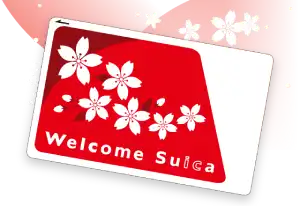
There are machines to buy them in the major airports and the larger train stations.
If you have an iPhone, then you can get the Welcome Suica app, that lets you use your phone instead of getting a physical card, but you do miss out on the nice design of the physical card. 😢
If you need more info, PiQtour has a great article and video on Suica and IC cards.
Navigate Trains and the Metro
I use Google Maps since you can enter in your destination, and tell it to use public transport.
So you don't have to look at your phone all the time on trains, you can get around by noting a few pieces of information. For example:
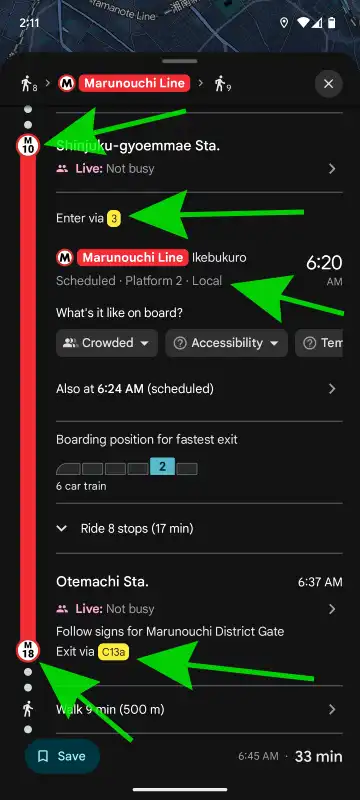
The key details here are
- Your starting station is Shinjuku-gyoemmae Sta. (M10).
- Find the Marunouchi Line (look for the red "M" symbol), head to Platform 2, and board a local train (express and limited express trains skip certain stops, while local trains go to every stop on their line).
- Google Maps often suggests the best train car that is closest to where you'll exit the station.
- Get off at Otemachi Sta. (M18).
- Exit via C13a. If you don't see it, follow signs for Marunouchi District Gate.
Last Quick Tips
- Pack light. Japan is filled with stairs and walking.
- Carry some cash. While credit cards are becoming more common, you'll still need Yen for small shops and temples. I budget about ¥10,000 per person per week in cash, more if you plan on hitting the Gachapon (capsule toy) machines.
- Always carry your passport on you.
- Bathrooms in Japan are generally good. Shopping centers, restaurants, and hotels tend to have the nicest ones.
- Have hand sanitizer in case a public bathroom doesn't have soap.
- If you plan to shop a lot, pack a bag inside your suitcase. That way you have extra space when you come back.
- Find hotels that are within a 5-10 minute walk of a Tokyo Metro or JR line in Tokyo.
- When given the option to pay in Japanese Yen or US Dollars, choose Yen. With 1 USD ≈ 150 JPY as of this writing, it is usually cheaper.
- Pack deodorant. It's difficult to find good deodorant in Japan.
- Fill out your customs form in advance through Visit Japan Web. Using the QR code at the airport is much faster than handwriting paper forms.
More Resources
These are some of the resources I like.
- Travel Guide Websites:
- Videos:
- Live streamers:
- Reddit: